
Kubernetes Demo Projects
PROJECT 1 — Nginx Web App Deployment + NodePort Service This project teaches: ✅ Step 1 — Create Deployment YAML […]
PROJECT 1 — Nginx Web App Deployment + NodePort Service This project teaches: ✅ Step 1 — Create Deployment YAML […]
Essential Docker Commands 1. Image Commands Command Description docker pull <image> Download an image from Docker Hub or registry docker
Mini-Project 1 — “Hello static site” Goal: create a tiny static site, containerise it with nginx, run it, push image
Description: Build a simple Python + Flask + MySQL microservice, containerize it with Docker, and demonstrate container monitoring and log
Step-by-Step on Ubuntu + Minikube Step 1️⃣ — Start Minikube $ minikube start –driver=docker Step 2️⃣ — Create Deployment YAML
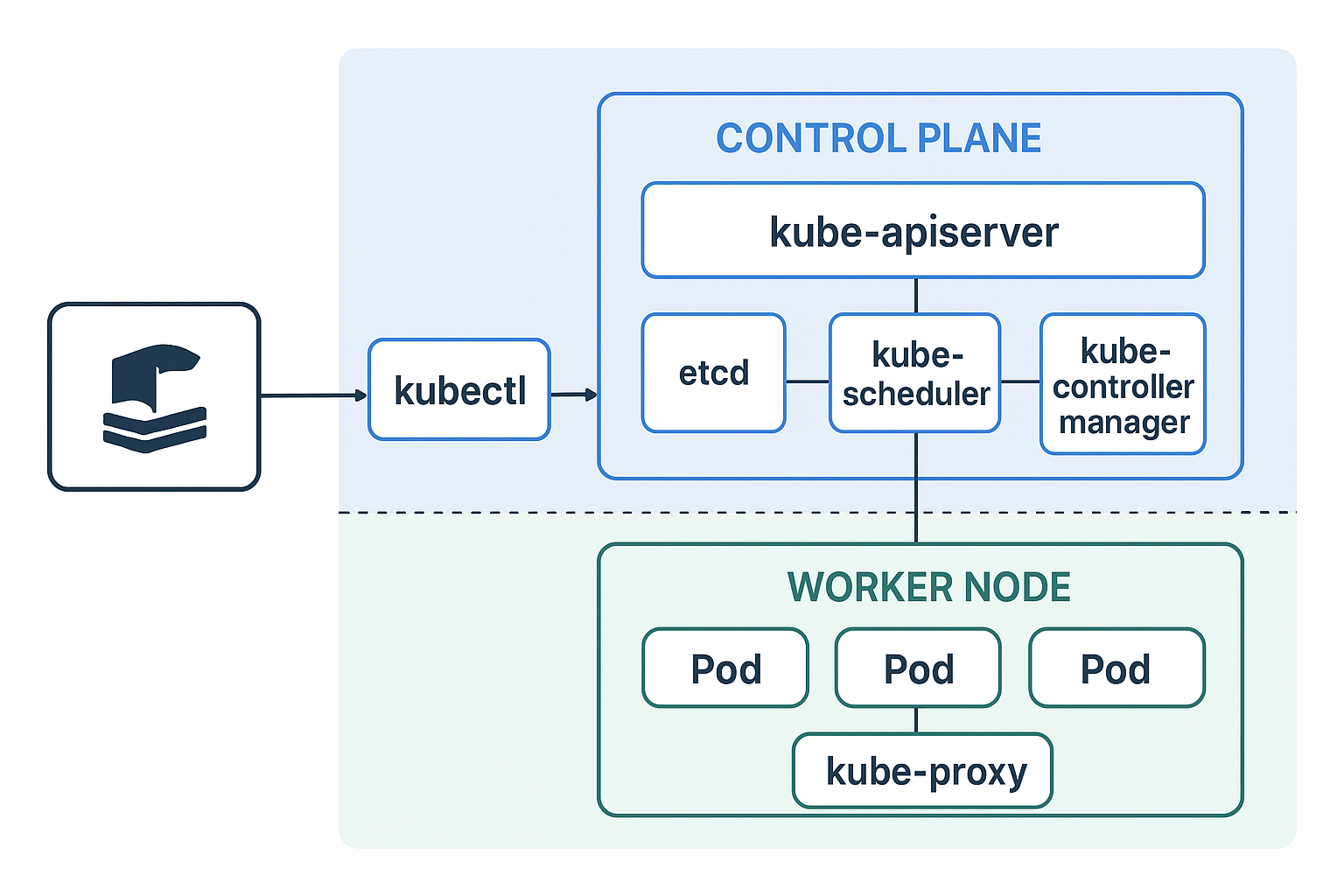
Kubernetes is built around the idea of objects that represent the desired state of your system — what you want
Step 1: Start Minikube minikube start –driver=docker This starts a single-node Kubernetes cluster running inside Docker. kubectl cluster-info kubectl get
1. 🐳 Install Docker Engine 2. 📦 Install Docker Compose 3. ⚙️ Install kubectl (Kubernetes CLI) 4. 🚀 Install Minikube