
Problem:
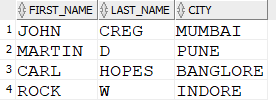
Required:
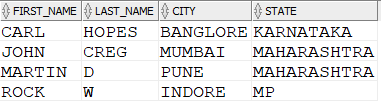

The SQL CASE statement allows you to perform IF-THEN-ELSE functionality within an SQL statement.
It’s good for displaying a value in the SELECT query based on logic that you have defined.
Syntax
CASE [expression]
WHEN condition_1 THEN result_1
WHEN condition_2 THEN result_2 …
WHEN condition_n THEN result_n
ELSE result
END case_name
Simple and Searched CASE Expressions
Two ways to use an SQL CASE statement
- Simple case expression
- Searched case expression
Simple CASE expression
The expression is stated at the beginning, and the possible results are checked in the condition parameters.
For example:
CASE name
WHEN ‘Ram’ THEN ‘Name is Ram’
WHEN ‘Rohan’ THEN ‘Name is Rohan’
END
Searched CASE expression
The expressions are used within each condition without mentioning it at the start of the CASE statement.
For example:
CASE
WHEN name = ‘Ram’ THEN ‘Name is Ram’
WHEN name = ‘Rohan’ THEN ‘Name is Rohan’
END
EXAMPLES
- Simple CASE Statement
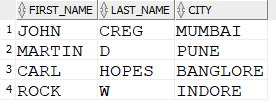
- Searched Case
| Simple Case Statement | Searched Case statement |
| SELECT first_name, last_name, city, CASE city WHEN ‘MUMBAI’ THEN ‘MAHARASHTRA’ WHEN ‘PUNE’ THEN ‘MAHARASHTRA’ WHEN ‘BANGLORE’ THEN ‘KARNATAKA’ WHEN ‘INDORE’ THEN ‘MP’ ELSE ‘Unknown’ END State FROM customer_city ORDER BY first_name, last_name; | SELECT first_name, last_name, city, CASE WHEN city = ‘MUMBAI’ THEN ‘MAHARASHTRA’ WHEN city = ‘PUNE’ THEN ‘MAHARASHTRA’ WHEN city = ‘BANGLORE’ THEN ‘KARNATAKA’ WHEN city = ‘INDORE’ THEN ‘MP’ ELSE ‘Unknown’ END State FROM customer_city ORDER BY first_name, last_name; |
- Searched CASE with numbers
Problem:
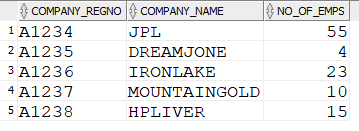
Condition-
< 10 : Small
>=10 <=50 : Medium
> 50 : Large
Required:
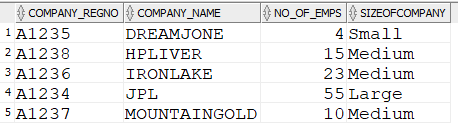
SELECT company_regno, company_name, no_of_emps,
CASE
WHEN no_of_emps < 10 THEN ‘Small’
WHEN no_of_emps >= 10 AND no_of_emps <= 50 THEN ‘Medium’
WHEN no_of_emps > 50 THEN ‘Large’
END SizeOfCompany
FROM company_data
ORDER BY company_name;
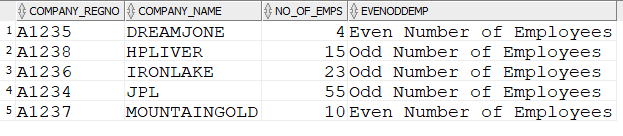
- CASE statement WITH IN Clause
- CASE Statement with Functions
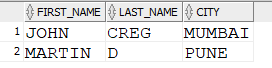
- CASE statement in where clause
Practice Questions:
1) Write an SQL query using the CASE statement to categorize employees based on their years of experience into the following groups: “Junior,” “Intermediate,” and “Senior.”
2) Create a query that utilizes a nested CASE statement to determine the bonus amount for employees. The bonus is based on the department: 10% for the “Sales” department, 8% for “Marketing,” and 5% for other departments.
3) Write a query to calculate the total sales for each product category, using the CASE statement to classify products into “High,” “Medium,” or “Low” sales based on predefined thresholds.
4) Write a query that uses the CASE statement to handle NULL values in a column, replacing them with a default value or providing a specific message.