Oracle PL/SQL Packages are one of the most powerful and widely used features in Oracle Database programming. If you have ever worked on real-time Oracle projects, you have almost certainly interacted with packages—whether calling a packaged procedure, debugging a package body, or deploying application logic as a package.
This blog is a complete, in-depth, guide to PL/SQL Packages. We will cover theory + hands-on examples, use the HR schema, explore real-time use cases, and walk through common troubleshooting scenarios. The goal is to make packages easy to understand, practical, and production-ready.
What Are Packages in Oracle PL/SQL?
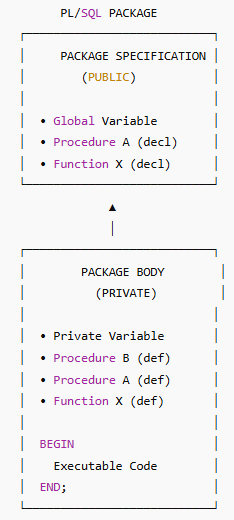
A PL/SQL Package is a database object that groups related procedures, functions, variables, cursors, and exceptions into a single logical unit.
Think of a package like a toolbox:
The package specification is the toolbox label—it shows what tools are available.
The package body is the actual toolbox—it contains the implementation of those tools.
In simple words:
A package allows you to define, organize, secure, and reuse PL/SQL code efficiently.
Specification = what is visible
Body = how it is implemented
What Are PL/SQL Packages? (Conceptual View)
PL/SQL packages were introduced to solve common problems such as:
Scattered procedures and functions
Difficulty maintaining large codebases
Poor performance due to repeated parsing
Lack of encapsulation
Packages provide:
Encapsulation – Hide implementation details
Modularity – Organize code logically
Reusability – Write once, use many times
Better performance – Loaded once into memory
In enterprise applications, almost all business logic is implemented using packages.
Components of a PL/SQL Package
A PL/SQL package consists of two main components:
1. Package Specification (Mandatory)
Declares what is available to users
Contains:
Procedure declarations
Function declarations
Public variables
Public cursors
2. Package Body (Optional but Usually Required)
Defines how things work internally
Contains:
Implementation of procedures/functions
Private variables
Private subprograms
Important: You can modify the package body without invalidating dependent objects—as long as the specification remains unchanged.
Benefits of Using Packages
1. Performance Improvement
Package code is loaded once into memory
Subsequent calls reuse the same memory
2. Encapsulation and Security
Hide complex logic in package body
Expose only required subprograms
3. Better Maintainability
Organized structure
Easy debugging and enhancement
4. Overloading Support
Same procedure name with different parameters
5. Dependency Management
Changing body does not invalidate dependent objects
Working with Packages
Creating a Package – Syntax Overview
Package Specification Syntax
CREATE [OR REPLACE] PACKAGE package_name IS|AS public type and variable declarations subprogram specifications END [package_name];
Package Body Syntax
CREATE [OR REPLACE] PACKAGE BODY package_name IS|AS private type and variable declarations subprogram bodies [BEGIN initialization statements] END [package_name];
Practical Example 1: Employee Utility Package (HR Schema)
Business Requirements
Get employee salary
Increase employee salary
Count employees by department
Package Specification
CREATE OR REPLACE PACKAGE emp_pkg AS
   FUNCTION get_salary(p_emp_id NUMBER) RETURN NUMBER;
   PROCEDURE raise_salary(p_emp_id NUMBER, p_percent NUMBER);
   FUNCTION dept_emp_count(p_dept_id NUMBER) RETURN NUMBER;
END emp_pkg;
Package Body
CREATE OR REPLACE PACKAGE BODY emp_pkg AS

   FUNCTION get_salary(p_emp_id NUMBER)
      RETURN NUMBER IS
      v_salary employees.salary%TYPE;
   BEGIN
      SELECT salary
      INTO v_salary
      FROM employees
      WHERE employee_id = p_emp_id;

      RETURN v_salary;
   EXCEPTION
      WHEN NO_DATA_FOUND THEN
         RETURN NULL;
   END get_salary;

   PROCEDURE raise_salary(p_emp_id NUMBER, p_percent NUMBER) IS
   BEGIN
      UPDATE employees
      SET salary = salary + (salary * p_percent / 100)
      WHERE employee_id = p_emp_id;
      COMMIT;
   END raise_salary;

   FUNCTION dept_emp_count(p_dept_id NUMBER)
      RETURN NUMBER IS
      v_count NUMBER;
   BEGIN
      SELECT COUNT(*)
      INTO v_count
      FROM employees
      WHERE department_id = p_dept_id;

      RETURN v_count;
   END dept_emp_count;

END emp_pkg;
Invoking Package Subprograms
Calling a Function
SELECT emp_pkg.get_salary(100) FROM dual;
Calling a Procedure
BEGIN
   emp_pkg.raise_salary(100, 10);
END;
Using Package Function in SQL
SELECT employee_id,
       emp_pkg.get_salary(employee_id)
FROM employees;
Displaying Package Information
SELECT object_name, object_type, status
FROM user_objects
WHERE object_name = 'EMP_PKG';
View Source Code
SELECT text
FROM user_source
WHERE name = 'EMP_PKG'
ORDER BY line;
Removing a Package
DROP PACKAGE emp_pkg;
DROP PACKAGE BODY emp_pkg;
Real-Time Use Cases of Packages
Business logic layer (salary, tax, payroll)
API layer for Java / .NET applications
Batch jobs and scheduled processes
Data access security layer
GRANT EXECUTE ON emp_pkg TO app_user;
Advanced PL/SQL Package Concepts
Public vs Private Components
Package Specification
CREATE OR REPLACE PACKAGE emp_adv_pkg AS
   PROCEDURE public_proc;
END emp_adv_pkg;
Package Body
CREATE OR REPLACE PACKAGE BODY emp_adv_pkg AS

   PROCEDURE private_proc IS
   BEGIN
      DBMS_OUTPUT.PUT_LINE('Private procedure');
   END private_proc;

   PROCEDURE public_proc IS
   BEGIN
      private_proc;
      DBMS_OUTPUT.PUT_LINE('Public procedure');
   END public_proc;

END emp_adv_pkg;
Private procedures cannot be called outside
Improves security and encapsulation
Stateful Packages
What Is a Stateful Package?
A package that retains variable values for a session.
Example: Session Counter
CREATE OR REPLACE PACKAGE state_pkg AS
   v_counter NUMBER;
   PROCEDURE increment_counter;
   FUNCTION get_counter RETURN NUMBER;
END state_pkg;
CREATE OR REPLACE PACKAGE BODY state_pkg AS

   PROCEDURE increment_counter IS
   BEGIN
      v_counter := NVL(v_counter, 0) + 1;
   END;

   FUNCTION get_counter RETURN NUMBER IS
   BEGIN
      RETURN v_counter;
   END;

BEGIN
   v_counter := 0;
END state_pkg;
Value persists within the same session
Resets for new sessions
Package Initialization Section
Executes once per session
Used to initialize variables, load lookup data
BEGIN
   DBMS_OUTPUT.PUT_LINE('Package Initialized');
END;
More Practical Examples and Real-Time Use Cases of PL/SQL Packages
Packages are not just a coding convenience—they are a design strategy used in almost every large Oracle-based system. This section focuses on hands-on scenarios that reflect how packages are used in real projects.
Example 1: CRUD Operations Package (Classic Enterprise Pattern)
Use Case
Most applications need a single controlled entry point for Create, Read, Update, and Delete operations instead of allowing direct table access.
Package Specification
CREATE OR REPLACE PACKAGE emp_crud_pkg AS
   PROCEDURE add_employee(
      p_emp_id NUMBER,
      p_name VARCHAR2,
      p_salary NUMBER,
      p_dept_id NUMBER
   );

   PROCEDURE update_salary(
      p_emp_id NUMBER,
      p_salary NUMBER
   );

   PROCEDURE delete_employee(
      p_emp_id NUMBER
   );
END emp_crud_pkg;
Package Body
CREATE OR REPLACE PACKAGE BODY emp_crud_pkg AS

   PROCEDURE add_employee(
      p_emp_id NUMBER,
      p_name VARCHAR2,
      p_salary NUMBER,
      p_dept_id NUMBER
   ) IS
   BEGIN
      INSERT INTO employees(employee_id, last_name, salary, department_id)
      VALUES (p_emp_id, p_name, p_salary, p_dept_id);
      COMMIT;
   END;

   PROCEDURE update_salary(
      p_emp_id NUMBER,
      p_salary NUMBER
   ) IS
   BEGIN
      UPDATE employees
      SET salary = p_salary
      WHERE employee_id = p_emp_id;
      COMMIT;
   END;

   PROCEDURE delete_employee(p_emp_id NUMBER) IS
   BEGIN
      DELETE FROM employees
      WHERE employee_id = p_emp_id;
      COMMIT;
   END;

END emp_crud_pkg;
Why This Matters
Centralized data access
Easy auditing and validation
Strong security control
Example 2: Business Rule Enforcement Package
Use Case
Enforce company rules such as salary limits or department-specific policies.
CREATE OR REPLACE PACKAGE salary_rule_pkg AS
   PROCEDURE validate_salary(p_salary NUMBER);
END salary_rule_pkg;
CREATE OR REPLACE PACKAGE BODY salary_rule_pkg AS

   PROCEDURE validate_salary(p_salary NUMBER) IS
   BEGIN
      IF p_salary < 3000 OR p_salary > 30000 THEN
         RAISE_APPLICATION_ERROR(
            -20010,
            'Salary must be between 3000 and 30000'
         );
      END IF;
   END;

END salary_rule_pkg;
Real-Time Scenario
Used before inserts/updates
Ensures data consistency across applications
Example 3: Reporting Package (Read-Only Logic)
Use Case
Applications often need reporting APIs without exposing tables.
CREATE OR REPLACE PACKAGE emp_report_pkg AS
   FUNCTION total_salary_by_dept(p_dept_id NUMBER)
      RETURN NUMBER;
END emp_report_pkg;
CREATE OR REPLACE PACKAGE BODY emp_report_pkg AS

   FUNCTION total_salary_by_dept(p_dept_id NUMBER)
      RETURN NUMBER IS
      v_total NUMBER;
   BEGIN
      SELECT SUM(salary)
      INTO v_total
      FROM employees
      WHERE department_id = p_dept_id;

      RETURN v_total;
   END;

END emp_report_pkg;
Advantages
Read-only access
Optimized SQL
Safe for dashboards and BI tools
Example 4: Error Logging Package (Very Common in Production)
Use Case
Instead of printing errors, log them into a table.
Error Log Table
CREATE TABLE error_log (
   error_id NUMBER GENERATED ALWAYS AS IDENTITY,
   error_date DATE,
   error_message VARCHAR2(4000),
   module_name VARCHAR2(100)
);
Logging Package
CREATE OR REPLACE PACKAGE error_log_pkg AS
   PROCEDURE log_error(
      p_message VARCHAR2,
      p_module VARCHAR2
   );
END error_log_pkg;
CREATE OR REPLACE PACKAGE BODY error_log_pkg AS

   PROCEDURE log_error(
      p_message VARCHAR2,
      p_module VARCHAR2
   ) IS
   BEGIN
      INSERT INTO error_log(error_date, error_message, module_name)
      VALUES (SYSDATE, p_message, p_module);
      COMMIT;
   END;

END error_log_pkg;
Real-Time Usage
Used in exception blocks
Centralized error tracking
Production debugging
Example 5: Package as an API Layer for Applications
Use Case
Java, .NET, Python apps never access tables directly.
GRANT EXECUTE ON emp_crud_pkg TO app_user;
REVOKE ALL ON employees FROM app_user;
Why This Is Industry Standard
Strong security
Schema changes don’t break apps
Logic changes stay inside database
Example 6: Stateful Package for User Session Tracking
Use Case
Track how many operations a user performs in a session.
CREATE OR REPLACE PACKAGE session_tracker_pkg AS
   v_actions NUMBER;
   PROCEDURE record_action;
   FUNCTION get_action_count RETURN NUMBER;
END session_tracker_pkg;
CREATE OR REPLACE PACKAGE BODY session_tracker_pkg AS

   PROCEDURE record_action IS
   BEGIN
      v_actions := NVL(v_actions, 0) + 1;
   END;

   FUNCTION get_action_count RETURN NUMBER IS
   BEGIN
      RETURN v_actions;
   END;

BEGIN
   v_actions := 0;
END session_tracker_pkg;
Used In
Auditing
Debugging
Performance testing
Example 7: Batch Processing Package
Use Case
End-of-day or monthly processing.
CREATE OR REPLACE PACKAGE payroll_pkg AS
   PROCEDURE process_monthly_payroll;
END payroll_pkg;
CREATE OR REPLACE PACKAGE BODY payroll_pkg AS

   PROCEDURE process_monthly_payroll IS
   BEGIN
      UPDATE employees
      SET salary = salary + 1000
      WHERE job_id = 'SA_REP';

      COMMIT;
   END;

END payroll_pkg;
Real-Time Usage
Scheduled via DBMS_SCHEDULER
Payroll, billing, reconciliation jobs
Example 8: Package Overloading
Use Case
Same operation, different inputs.
CREATE OR REPLACE PACKAGE overload_pkg AS
   PROCEDURE show_emp(p_emp_id NUMBER);
   PROCEDURE show_emp(p_name VARCHAR2);
END overload_pkg;
CREATE OR REPLACE PACKAGE BODY overload_pkg AS

   PROCEDURE show_emp(p_emp_id NUMBER) IS
   BEGIN
      DBMS_OUTPUT.PUT_LINE('Employee ID: ' || p_emp_id);
   END;

   PROCEDURE show_emp(p_name VARCHAR2) IS
   BEGIN
      DBMS_OUTPUT.PUT_LINE('Employee Name: ' || p_name);
   END;

END overload_pkg;
High-Level Real-World Use Cases Summary
Packages are used for:
Business logic enforcement
Application API layers
Security abstraction
Error handling frameworks
Reporting and analytics
Batch jobs
Performance optimization
Session state management
Interview Tip (Very Important)
If asked “Why packages are preferred over standalone procedures?”, always answer:
Packages improve performance, enforce security, support encapsulation, allow state management, reduce dependency issues, and provide a clean API for applications.
Error Handling & Logging Framework Using Packages (Enterprise Approach)
Introduction
In real-world Oracle applications, DBMS_OUTPUT is never enough.
Production systems require:
Centralized error logging
Consistent error messages
Traceability (who, when, where)
Minimal impact on business logic
This is where an Error Handling & Logging Framework using PL/SQL Packages becomes essential.
This blog explains:
Why centralized error handling is needed
How to design an error logging table
How to build a reusable logging package
How to integrate logging into business packages
Real-time production use cases
Best practices followed in enterprise systems
Why Error Handling Must Be Centralized
Problems Without a Framework
Errors scattered across procedures
Inconsistent error messages
Difficult debugging in production
No audit trail
Solution
✔ A dedicated logging package ✔ Business logic stays clean ✔ Errors are logged automatically
Architecture Overview
Application / User
        ↓
Business Package (emp_pkg, payroll_pkg)
        ↓
Error Logging Package (error_log_pkg)
        ↓
ERROR_LOG table
CREATE OR REPLACE PACKAGE error_log_pkg AS
   PROCEDURE log_error(
      p_program_name VARCHAR2,
      p_custom_msg   VARCHAR2 DEFAULT NULL
   );
END error_log_pkg;
Package Body
CREATE OR REPLACE PACKAGE BODY error_log_pkg AS

   PROCEDURE log_error(
      p_program_name VARCHAR2,
      p_custom_msg   VARCHAR2 DEFAULT NULL
   ) IS
   BEGIN
      INSERT INTO error_log (
         error_date,
         error_code,
         error_message,
         program_name,
         user_name,
         stack_trace
      )
      VALUES (
         SYSDATE,
         SQLCODE,
         NVL(p_custom_msg, SQLERRM),
         p_program_name,
         USER,
         DBMS_UTILITY.format_error_backtrace
      );

      COMMIT;
   END log_error;

END error_log_pkg;
Why This Package Is Powerful
Works for any application module
No dependency on UI or client
Automatically captures system errors
Reusable across schemas and projects
Step 3: Integrating Logging into Business Packages
Example: Employee Salary Update with Error Handling
CREATE OR REPLACE PACKAGE emp_err_pkg AS
   PROCEDURE update_salary(
      p_emp_id NUMBER,
      p_salary NUMBER
   );
END emp_err_pkg;
CREATE OR REPLACE PACKAGE BODY emp_err_pkg AS

   PROCEDURE update_salary(
      p_emp_id NUMBER,
      p_salary NUMBER
   ) IS
   BEGIN
      IF p_salary < 0 THEN
         RAISE_APPLICATION_ERROR(-20001, 'Salary cannot be negative');
      END IF;

      UPDATE employees
      SET salary = p_salary
      WHERE employee_id = p_emp_id;

      IF SQL%ROWCOUNT = 0 THEN
         RAISE_APPLICATION_ERROR(-20002, 'Employee not found');
      END IF;

      COMMIT;

   EXCEPTION
      WHEN OTHERS THEN
         error_log_pkg.log_error(
            p_program_name => 'EMP_ERR_PKG.UPDATE_SALARY'
         );
         RAISE;
   END update_salary;

END emp_err_pkg;
Step 5: Logging Without Interrupting Business Flow
Sometimes logging should not stop execution.
BEGIN
   -- risky operation
EXCEPTION
   WHEN OTHERS THEN
      error_log_pkg.log_error(
         'PAYROLL_PKG.CALCULATE_TAX',
         'Tax calculation failed'
      );
      -- continue processing
END;
Used in:
Batch jobs
Non-critical operations
Reporting jobs
Step 6: Error Logging in Batch Processing
Payroll Batch Example
FOR rec IN (SELECT employee_id FROM employees) LOOP
   BEGIN
      emp_err_pkg.update_salary(rec.employee_id, 5000);
   EXCEPTION
      WHEN OTHERS THEN
         error_log_pkg.log_error(
            'PAYROLL_BATCH',
            'Failed for emp_id: ' || rec.employee_id
         );
   END;
END LOOP;
✔ One failure does not stop entire batch ✔ Errors reviewed later
Step 7: Securing the Logging Framework
GRANT EXECUTE ON error_log_pkg TO app_user;
REVOKE ALL ON error_log FROM app_user;
✔ Application can log ✔ Cannot view or manipulate log table
Real-Time Use Cases
Error handling packages are used in:
Banking systems (transaction failures)
HR & payroll applications
E-commerce order processing
Data migration scripts
Batch & scheduler jobs
Common Mistakes to Avoid
❌ Using DBMS_OUTPUT in production ❌ COMMIT inside logging + business logic without control ❌ Logging incomplete error details ❌ Not re-raising critical errors
PL/SQL Packages – Practice Questions (Hands-On & Conceptual)
1. Basic Package Creation
Create a package using the HR schema that:
Returns an employee’s job title based on employee_id
Returns the department name based on department_id
Requirements
Use one function for each requirement
Handle NO_DATA_FOUND properly
2. Package Specification vs Body
Create a package where:
One procedure is public
One procedure is private
The public procedure internally calls the private procedure
Question
Why can’t the private procedure be called directly from SQL*Plus?
3. Stateful Package Behavior
Create a stateful package that:
Tracks how many times a procedure is called in a session
Returns the count using a function
Test Case
Call the procedure multiple times in the same session
Open a new session and verify the counter resets
4. Package Initialization Section
Create a package that:
Initializes a global variable in the package initialization block
Displays a message when the package is loaded
Question
How many times does the initialization block execute per session?
5. CRUD Operations Using a Package
Design a package that:
Inserts a new employee
Updates an employee salary
Deletes an employee
Constraints
Do not grant direct table access to users
Grant only EXECUTE privilege on the package
6. Error Handling & Logging Package
Create a reusable error logging package that:
Logs SQLCODE, SQLERRM, program name, and timestamp
Is called from another business package when an error occurs
Bonus
Re-raise the error after logging
7. AUTHID Definer vs Invoker Rights
Create two packages:
One using AUTHID DEFINER
One using AUTHID CURRENT_USER
Question
In which scenario should invoker rights be preferred?
Test behavior using two different schemas
8. Performance Optimization with Packages
Create a package that:
Uses BULK COLLECT and FORALL to update salaries
Compares performance with a row-by-row loop
Question
Why is bulk processing faster?
9. Troubleshooting ORA-04068
Simulate a scenario where:
A stateful package is used
The package body is recompiled during an active session
Questions
What error occurs?
Why does it happen?
How can it be avoided in production?
10. Real-Time Design Scenario (Interview-Style)
You are designing an HR application where:
Applications must not access tables directly
All business logic must be reusable
Errors must be logged centrally
Performance must be optimized
Task
Explain how you would design:
Packages
Security model
Error handling framework
Pro Tip for Practice
When solving these questions, always think in terms of:
Encapsulation
Security
Performance
Maintainability
Real-world usage
If you can confidently solve these 10 questions, you’re operating at a strong Oracle PL/SQL developer level 💪
Disclaimer
This blog is intended for educational purposes only. The examples are based on the standard Oracle HR schema and may require modification before being used in production environments. Always follow your organization’s coding standards, security policies, and testing procedures before deploying database code.