
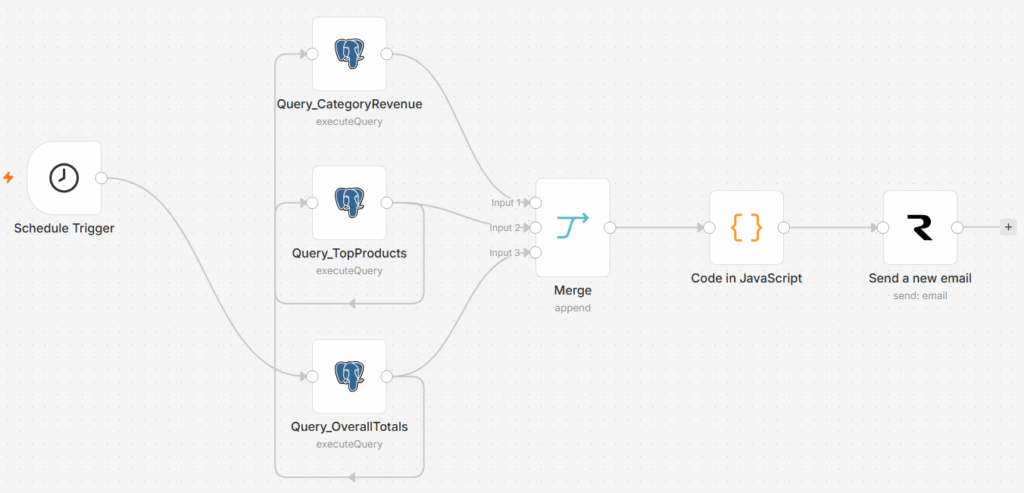
Daily Sales Report Workflow
Automatically query yesterday’s sales from Neon PostgreSQL, aggregate KPIs, identify top products, and email a fully formatted HTML report — every morning at 8 AM.
What This Workflow Does
Zero-touch daily sales intelligence, delivered to your inbox every morning.
- Fully automated — runs every day at 8 AM via Schedule Trigger
- 3 parallel PostgreSQL queries — clean, no data duplication
- Formatted HTML email with KPI cards, category table & top products table
- Built on free tools — Neon PostgreSQL + Resend free tier
| Tool | Purpose | Cost |
|---|---|---|
| n8n | Workflow automation platform | Free / Self-hosted |
| Neon PostgreSQL | Cloud database for sales data | Free tier |
| Resend | Email delivery service | Free — 3,000/month |
| Code Node (n8n) | Build dynamic HTML email from query data | Built-in |
| # | Node Name | Node Type | Purpose |
|---|---|---|---|
| 1 | Schedule Trigger | Schedule Trigger | Fires every day at 8 AM |
| 2 | Query_CategoryRevenue | PostgreSQL | Revenue breakdown by product category |
| 3 | Query_TopProducts | PostgreSQL | Top 5 best-selling products |
| 4 | Query_OverallTotals | PostgreSQL | Headline KPIs: orders, revenue, avg value |
| 5 | Merge | Merge (Combine) | Combines all 3 query results cleanly |
| 6 | Build Report | Code (JS) | Generates formatted HTML email body |
| 7 | Send Report | Resend | Emails the report to the sales manager |
Set Up Neon PostgreSQL (Free Cloud DB)
Create your free database and save the connection credentials before building the workflow.
- Go to neon.tech → Click “Sign Up” (free)
- After login → Click “New Project”
- Project Name:
hr-demo - Region: Choose closest to you
- Click “Create Project”
- You’ll see a Connection String like:
postgresql://username:password@ep-xxx.neon.tech/neondbSave these details:
| Field | Value |
|---|---|
| Host | ep-xxx.neon.tech |
| Database | neondb |
| Username | your username |
| Password | your password |
| Port | 5432 |
Set Up the Database in Neon
Open your Neon dashboard → Click SQL Editor → Run the SQL statements below in order.
CREATE TABLE products (
  id       SERIAL PRIMARY KEY,
  name     VARCHAR(100),
  category VARCHAR(50),
  price    NUMERIC(10,2)
);

CREATE TABLE customers (
  id        SERIAL PRIMARY KEY,
  full_name VARCHAR(100),
  email     VARCHAR(100)
);

CREATE TABLE orders (
  id           SERIAL PRIMARY KEY,
  customer_id  INT REFERENCES customers(id),
  product_id   INT REFERENCES products(id),
  quantity     INT,
  total_amount NUMERIC(10,2),
  order_date   DATE DEFAULT CURRENT_DATE,
  status       VARCHAR(20) DEFAULT 'Completed'
);INSERT INTO products (name, category, price) VALUES
('Laptop Pro', 'Electronics', 85000),
('Office Chair', 'Furniture', 12000),
('Standing Desk', 'Furniture', 25000),
('Wireless Mouse', 'Electronics', 1500),
('Notebook Pack', 'Stationery', 500),
('USB Hub', 'Electronics', 2000),
('Whiteboard', 'Stationery', 3500);
INSERT INTO customers (full_name, email) VALUES
('Rahul Sharma', 'rahul@example.com'),
('Priya Mehta', 'priya@example.com'),
('Amit Patel', 'amit@example.com'),
('Sneha Joshi', 'sneha@example.com');INSERT INTO orders (customer_id, product_id, quantity, total_amount, order_date, status) VALUES
(1, 1, 1, 85000, CURRENT_DATE - 1, 'Completed'),
(2, 2, 2, 24000, CURRENT_DATE - 1, 'Completed'),
(3, 4, 3, 4500, CURRENT_DATE - 1, 'Completed'),
(4, 5, 5, 2500, CURRENT_DATE - 1, 'Completed'),
(1, 3, 1, 25000, CURRENT_DATE - 1, 'Completed'),
(2, 6, 2, 4000, CURRENT_DATE - 1, 'Completed'),
(3, 7, 1, 3500, CURRENT_DATE - 1, 'Completed'),
(4, 1, 1, 85000, CURRENT_DATE - 1, 'Completed');Create & Configure the Workflow in n8n
Build the automation canvas step by step — from the schedule trigger to the merge node.
- Open n8n → Click “New Workflow”.
- Name it: “Daily Sales Report”.
- Click “+” → Search “Schedule Trigger” → Select it.
- Configure as follows:
| Field | Value |
|---|---|
| Trigger Interval | Days |
| Days Between Triggers | 1 |
| Trigger at Hour | 8 |
| Trigger at Minute | 0 |
All 3 Postgres nodes must branch directly from the Schedule Trigger — NOT chained one after another. This prevents data duplication.
- Click “+” from Schedule Trigger → Add Postgres Node → Rename to
Query_CategoryRevenue. - Go back to Schedule Trigger → Click “+” again → Add Postgres Node → Rename to
Query_TopProducts. - Go back to Schedule Trigger → Click “+” again → Add Postgres Node → Rename to
Query_OverallTotals.
Use your existing Neon credential in all 3 nodes. Set Operation → Execute Query in each.
SELECT
  p.category,
  COUNT(o.id)         AS total_orders,
  SUM(o.quantity)     AS total_units,
  SUM(o.total_amount) AS total_revenue
FROM orders o
JOIN products p ON o.product_id = p.id
WHERE o.order_date = CURRENT_DATE - 1
  AND o.status = 'Completed'
GROUP BY p.category
ORDER BY total_revenue DESC;SELECT
p.name AS product_name,
p.category,
SUM(o.quantity) AS units_sold,
SUM(o.total_amount) AS revenue
FROM orders o
JOIN products p ON o.product_id = p.id
WHERE o.order_date = CURRENT_DATE - 1
AND o.status = 'Completed'
GROUP BY p.name, p.category
ORDER BY revenue DESC
LIMIT 5;SELECT
COUNT(DISTINCT o.id) AS total_orders,
COUNT(DISTINCT o.customer_id) AS unique_customers,
SUM(o.total_amount) AS gross_revenue,
AVG(o.total_amount) AS avg_order_value
FROM orders o
WHERE o.order_date = CURRENT_DATE - 1
AND o.status = 'Completed';- Click “+” → Search “Merge” → Select it.
- Configure: Mode → Combine, Combination Mode → Multiplex.
- Connect:
Query_CategoryRevenue→ Input 1 |Query_TopProducts→ Input 2 |Query_OverallTotals→ Input 3
Code Node — Build HTML Report
JavaScript that assembles the dynamic HTML email body from all three query results.
- Click “+” after Merge → Search “Code” → Select it.
- Set Language → “JavaScript” → Paste the following code:
// Pull results from each named node
const categories  = $('Query_CategoryRevenue').all();
const topProducts = $('Query_TopProducts').all();
const totals      = $('Query_OverallTotals').all();
const t = totals[0].json;

// Format yesterday's date
const yesterday = new Date();
yesterday.setDate(yesterday.getDate() - 1);
const dateStr = yesterday.toLocaleDateString('en-IN', {
  weekday: 'long', year: 'numeric', month: 'long', day: 'numeric'
});

// Currency formatter (Indian Rupees)
const formatCurrency = (val) =>
  '₹' + Number(val).toLocaleString('en-IN', { maximumFractionDigits: 0 });

// Build category & product rows, then return HTML + subject
const categoryRows = categories.map(c => `<tr>...</tr>`).join('');
const productRows  = topProducts.map((p, i) => `<tr>...</tr>`).join('');

return [{ json: {
  html: `... full HTML template ...`,
  subject: `Daily Sales Report — ${'$'}{dateStr}`
}}];Query_CategoryRevenue, Query_TopProducts, and Query_OverallTotals in the Code node must exactly match the names you gave your Postgres nodes on the canvas.
Send Report, Test & Activate
Wire up the Resend node, validate all scenarios, then go live.
| Field | Value |
|---|---|
| From | onboarding@resend.dev |
| To | your-email@example.com |
| Subject | {{ $json.subject }} |
| Email Type | HTML |
| Body | {{ $json.html }} |
- Click “Test Workflow” in n8n.
- Verify all 7 nodes show green checkmarks. ✅
- Check your inbox — report should arrive with 4 KPI cards, category table, and Top 5 Products table (no duplicates).
- Toggle the “Active” switch in the top right corner of n8n.
- The workflow is now live — runs every day at 8 AM automatically. ✅
| Section | Content |
|---|---|
| Header | Dark navy banner with report title and date |
| KPI Cards (4) | Total Orders │ Unique Customers │ Gross Revenue │ Avg Order Value |
| Category Table | Category / Orders / Units Sold / Revenue — sorted by revenue desc |
| Top 5 Products | Rank / Product Name / Category / Units / Revenue |
| Footer | Automated report disclaimer |
| Test Case | How to Test | Expected Result |
|---|---|---|
| Normal report | Run workflow with sample data inserted | Full HTML email with all 3 sections |
| Top 5 no repetition | Check Top Products section in email | Exactly 5 rows — no duplicates |
| No orders yesterday | Delete all rows from orders, re-run | Empty tables in email — no crash |
| Add more orders | Insert extra rows for CURRENT_DATE – 1, re-run | Updated totals and rankings in email |
| Different categories | Insert orders for new product categories | New categories appear in category table |
Why Parallel Queries Beat Chained Queries
Understanding why 3 branches + Merge is the correct pattern — not 3 nodes in a chain.
| Aspect | Chained Nodes (Old) | Parallel + Merge (Current) |
|---|---|---|
| Data isolation | Queries bleed into each other | Each query result fully isolated |
| Duplication bug | Top 5 Products repeats 3× | Each section appears exactly once |
| Performance | Sequential — one waits for another | All 3 queries run simultaneously |
| Scalability | Adding a 4th query multiplies the bug | Just add another parallel branch |
| Debuggability | Hard to tell which node has what data | Each node clearly named and isolated |
- Replace
onboarding@resend.devwith a verified company domain email. - Add more queries (e.g. regional breakdown, returns) as additional parallel branches.
- Connect to a real production PostgreSQL database instead of Neon.